|
This calculator was created to help calculate the copier magnification setting for scaling model airplane (or boat,
or helicopter, or car, or anything) up or down.
The process is very simple.
1) Select an object on the plans you already have (e.g., the wingspan) and measure is using length units
available in the dropdown box. Enter that value and units (inches, meters, etc.) in the FROM area.
2) Enter the new length and units that you want the object to be in the TO area.
3) The % value given in the MAGNIFICATION are is the setting for the copier. It also reports
the scale value.
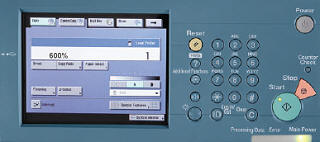 Example:
The length of the wing on the plans you have Example:
The length of the wing on the plans you have
now is 10 inches, and you want to increase it
to 60 inches. The result is a required copier
setting of 600%. The scale is 6:1 (six-to-one).
The copier control panel to the right is typical of what you would use. If you are taking your plans in to a copy
center like Kinkos/FedEx or Staples, you can tell them what magnification setting to use.
As a real-world example, I have an original Sig Citabria kit with full-size plans that have a wingspan length of
72". I wanted to build a smaller version with a wingspan of 48", so I calculated a magnification value of 72/48 =
66.666%. Since the copier at Staples only did integer magnification values, I told them to do a 67% magnification.
That resulted in a wingspan of 48.24 inches - close enough!
|